Shot Log Guide
Everything you need to know about logging espresso shots with Coffee Tracker. This guide walks through each section of the shot form to help you capture the data that matters most.
Equipment
Pick the grinder, machine, and tools from your collection. Only gear you've added on My Equipment appears here — add or remove items there anytime.
Grinder
Choose the grinder you're using. The grind is arguably the most important variable in espresso — different grinders produce different particle distributions, and even the same numeric grind setting can mean very different things across models.
💡 Tips
- Select “Pre-ground” if you're using pre-ground coffee — the grind level field will be hidden automatically.
- Add multiple grinders if you switch between them to compare results.
- Grind level is a numeric setting on your grinder (e.g., 12 on a Niche Zero or 2.5 on a Comandante).
Machine
Select your espresso machine. Different machines have different boiler types, pressure profiles, and temperature stability — all of which affect extraction. Tracking the machine helps you understand results in context.
💡 Tips
- This field is optional — useful if you always use the same machine, but important if you have access to multiple.
- Add a new machine any time from the dropdown.
Tools
Toggle the prep tools you used (WDT, distributor, tamper, etc.). Tools are listed separately from grinder and machine so you can mix and match what you actually reached for on the bar.
Recipe
The recipe defines your input parameters — beans, dose, grind, temperature, and more. Getting the recipe right is the key to reproducible espresso.
Bean
Select the coffee beans you're using for this shot. Knowing which coffee you used lets you compare results across different beans and track how a specific roast evolves over time.
💡 Tips
- Add the roaster name and roast date when creating a new bean for easy identification later.
- Track “days post roast” to learn how your beans taste as they age.
- Use the search to quickly find previously added beans.
Dose
The weight of ground coffee in grams (typically 16–22g for espresso). Use the quick-select buttons for common doses or dial in an exact value with the stepper. Learn more about dose in the glossary.
Target Yield
The target weight of liquid espresso in your cup, in grams. The ratio buttons (1:1, 1:2, 1:3, 1:4) auto-calculate yield from your dose. A 1:2 ratio (e.g., 18g in → 36g out) is a common starting point. Lower ratios like 1:1 are called ristretto (syrupy and intense), while higher ratios like 1:3–1:4 are called lungo (thinner but can reveal different flavors). Learn more about brew ratios in the glossary.
Grind Level
The numeric grind setting on your grinder. The grind level is specific to each grinder model and helps you dial in your shots.
Brew Temperature
The water temperature for brewing, shown in °F or °C. Use the quick-select buttons to switch units. Higher temperatures generally extract more, while lower temperatures can highlight delicate flavors. Learn more about brew temperature in the glossary.
💡 Common Starting Point
200–205°F (93–96°C) is a good starting point for most coffees. This range provides balanced extraction and works well across different roast levels.
🌡️ Example Temperatures
- 195–200°F (90–93°C): Lower temperatures highlight delicate, bright flavors and reduce bitterness. Ideal for light roasts or when you want to preserve fruity, floral notes.
- 200–205°F (93–96°C): The standard range for balanced extraction. A reliable starting point that works for most coffees and roast levels.
- 205–212°F (96–100°C): Higher temperatures increase extraction and enhance body. Useful for dark roasts, under-extracted shots, or when you want more intensity and richness.
Brew Pressure
The extraction pressure in bars (typically 6–12 bar). Enable this field if your machine supports pressure control. Learn more about pressure in the glossary.
Pre-infusion
A low-pressure soak before full extraction, measured in seconds. Enable this field if your machine supports pre-infusion. Learn more about pre-infusion in the glossary.
Results
Results capture the measurable outcomes of your shot — what actually happened during extraction. These objective measurements help you understand the technical performance of your shot.
Actual Yield
The actual weight of espresso produced in grams. The calculated ratio (e.g., 1:2) is shown automatically based on your dose and actual yield. Use the quick button to copy your target yield if it matches. Learn more about yield in the glossary.
Brew Time
How long the shot took from start to finish, in seconds. The calculated flow rate (g/s) is shown automatically. Use the built-in timer to track brew time hands-free.
Est. Max Pressure
The estimated maximum pressure reached during extraction, in bars. Enable this field if you want to track pressure profiles.
Shot Quality
Rate the technical quality of the extraction from 1–5. This measures extraction evenness, not taste. Enable this field to track extraction quality separately from taste.
Understanding Shot Quality
Shot quality ratings help you assess extraction evenness:
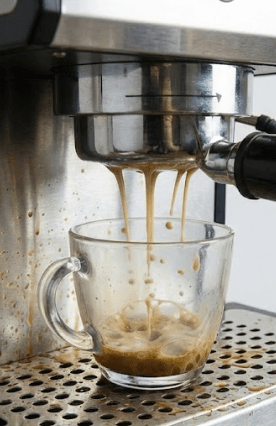
1-2: Poor — Severe Channeling
This image demonstrates a failed extraction. Notice the severe channeling and spraying, with multiple thin, uneven streams of coffee. The flow is turbulent and messy, and a proper crema has failed to form, indicating a lack of pressure and even extraction.
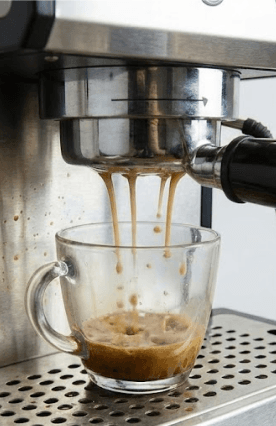
3: Moderate — Some Channeling
This shot shows a moderate level of quality. While it's a significant improvement over the poor shot, there are still visible signs of channeling and unevenness. The flow is not a single, consistent stream, and the crema is thin and patchy, indicating partial extraction issues.
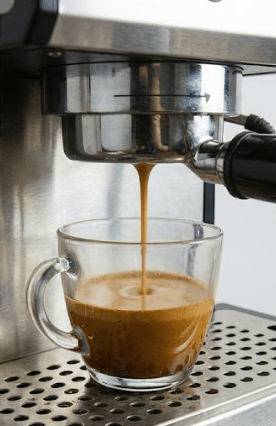
4-5: Excellent — Good to Excellent Even Extraction
This image depicts an excellent espresso shot. There is no visible channeling. The flow is a single, consistent, honey-like stream, and a thick, rich, uniform crema with a beautiful reddish-brown hue has formed on top, indicating a perfect and even extraction.
For detailed guidance on understanding espresso extraction quality, channeling, and what makes a good shot, see these resources: Craft Coffee Spot, Coffee Machine Tools, My Coffee Explorer, and Bean Ground which explain how to identify, diagnose, and fix channeling issues that affect shot quality.
Tasting Notes
Tasting notes capture your subjective experience of the shot — what it tastes like, how it feels, and your overall enjoyment. These fields help you develop your palate and identify what you like.
Rating
Rate your overall enjoyment of the shot from 1–5 (Undrinkable, Didn't Enjoy, Enjoyed, Really Enjoyed, Loved It). This is your subjective rating of how much you liked it, separate from technical quality. The rating helps you quickly spot your best shots in the history.
Bitter
Rate the bitterness of the shot on a 0–4 scale. The slider uses a colored dot that transitions from neutral gray (0) to dark brown (4), providing visual feedback that matches the taste characteristic. Use this to track bitterness levels across different shots and recipes.
Sour
Rate the sourness (acidity) of the shot on a 0–4 scale. The slider uses a colored dot that transitions from neutral gray (0) to bright yellow (4), providing visual feedback that matches the taste characteristic. Use this to track acidity levels and understand how different recipes affect sourness.
Flavors
Use the SCA-inspired flavor wheel to tag specific tasting notes (chocolate, citrus, floral, etc.). Navigate through categories to find the flavors you detect.
Body / Texture
Capture the mouthfeel and texture of the shot (e.g., creamy, thin, syrupy, velvety). Learn more about body in the glossary.
Notes
Any additional observations, thoughts, or context about the shot. Use this for free-form notes that don't fit into the structured fields above.
Ready to Log Your First Shot?
Start tracking your espresso journey and watch your shots improve over time with data-driven insights.
Log a Shot →